
One of the many powerful features of Solid Converter PDF to Word is the ability to extract tables from a PDF document to Microsoft Excel.
Does your PDF document contain tables or data in table form? Do you need data extracted from the tables within the PDF document? You can choose to extract those tables from the entire document or specific pages using the table extraction feature of Solid Converter PDF v4.
Friday, July 11, 2008
Extracting Tables to Excel


Thursday, July 3, 2008
Rearrange Pages
Using the features of Solid Converter PDF to Word v4 you can rearrange specific pages of a PDF document depending on your needs. Does the PDF contain information on page 33 that should be page 2? Should the last 10 pages be the first 10 pages of the document? If this is the case, simply open the PDF document in Solid Converter PDF v4 and rearrange the pages according to the task at hand.
Friday, June 27, 2008
Creating Optimized PDF Documents
There are many advantages of publishing your content in PDF documents. One distinct advantage is how PDF documents are compact and easy to exchange. They can also be further optimized for distribution. Perhaps you are creating PDF documents for the web. Using the optimization features of Solid Converter PDF to Word v4 can further reduce the file size and boost the display speed, saving bandwidth and workflow. Applying the optimization options of Solid Converter PDF v4 can reduce the documents size for Web or print, while preserving the desired level of quality.
Monday, June 23, 2008
Secure your PDF files
Working on a presentation? Perhaps you are in the legal profession and create PDF documents containing sensitive and critical information. With the password protection features of Solid Converter PDF to Word v4 you can protect your PDF file from unauthorized altering or viewing. By assigning a password to a PDF file you can restrict viewing, printing, editing and extraction of the PDF document.
Friday, June 13, 2008
Quickest way to convert PDF files into Word documents
Do you have a PDF file that needs editing? Perhaps you have a newsletter that needs updating before the next event.
Solid Converter PDF to Word v4 offers timesaving steps when compared to Adobe Acrobat to accomplish a quality conversion needed for your task.
Monday, May 19, 2008
New Releases: Solid Converter PDF v4 and Solid PDF Tools
We're proud to announce that Solid Converter® PDF to Word v4 is now available, in addition to an updated version of Solid PDF Tools Scan to PDF that has all of the new features in Solid Converter PDF v4.
Tuesday, March 18, 2008
Scrolling Window Capture in Firefox using Solid Capture
Solid Capture has a wonderful feature called Scrolling Window Capture. It allows you to capture an entire web page as a single image. Unfortunately, this feature is only available in Internet Explorer and not Firefox.
So what are our customers who prefer using Firefox over IE left to do (besides use IE)? One good workaround we've found is using IE Tab to view Internet Explorer inside of a tab in Firefox. You can then use Solid Capture to take a screen shot of the IE tab in Firefox. When you're done taking the screen shot you can change the tab back to Firefox and keep working.
At the time of this writing the latest version of the add-on that works with Firefox 2 is 1.3.3.20070528 (try saying that five times fast). You can download it from here.
The product is a little short on instructions, but it isn't hard to use. When you're at a page that you want to view in IE, click the IE Tab button on your toolbar to switch to IE. When you want to switch the tab back, click the IE Tab button again.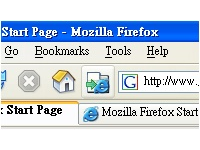
(The IE Tab button in Firefox)
It may install itself automatically for people, but when we tested it we didn't see any extra buttons appear on our navigation toolbar like it does in the above image.
We were able to add it by going into Firefox | View | Toolbars | Customize. Click and drag the IE Tab button to your toolbar of choice to place the button. You can click the IE Tab button whenever you need to open a page in Firefox in Internet Explorer.
Subscribe to:
Posts (Atom)

 Follow us on Twitter