Showing posts with label PDF/A. Show all posts

Wednesday, December 11, 2013

Batch Processing with Solid Commander

Looking for an automated batch processing solution for PDF processing? Try Solid Commander - automated PDF to Word conversion, PDF/A validation, PDF to PDF/A conversion, searchable PDF creation and text extraction.


Take a video tour and learn more.


Wednesday, October 9, 2013

PDF/A1-b or PDF/A-2b?

Question: Is it recommended to use PDF/A1-b or PDF/A-2b?

Answer: PDF/A-1 is based on PDF version 1.4.  PDF/A-2 is based on the latest PDF standard which supports more functionality and better compression than the older format (compressed object streams and compressed cross reference streams for example). With this in mind, we recommend PDF/A-2b.

Monday, September 30, 2013

What makes it a PDF?

Often people will ask "What is a PDF file?" or "How do you View a PDF File?". These lead to a couple of basic answers.

Tuesday, July 9, 2013

v8 has New User Interface

v8 includes a new and improved user interface where the core tasks are easily available.

Solid PDF Tools v8 User Interface
The v8 rewrite was a conscious shift back to our core features : a focus on document reconstruction functionality. 

Adding new features to the product going forward is prioritized by customer requests so please send your feedback to support@soliddocuments.com.

The v8 rewrite was required to take advantage of 64-bit architectures and multi-core processors. A rewrite using Microsoft .NET was required so that we could engineer the product using our own Solid Framework SDK (unlike the older products which were based on a legacy architecture).

Watch our getting started video.

Thursday, December 13, 2012

PDF/A-1 vs. PDF/A-2

PDF/A is an archiving standard that was published in 2005 by ISO. PDF/A-1 was based on the original Adobe PDF 1.4 version. This version set the standard for ensuring that PDF content could always be visually reproduced regardless of future changes to viewing and printing technology.

PDF/A-2 was released by ISO in July 2011. PDF/A-1 files are compliant archive documents and do not need to be converted to the new standard. PDF/A-2 does not replace the PDF/A-1 standard.

So, what is the difference between these two standards you might ask.

PDF/A-1 is based on PDF version 1.4 (based on Adobe PDF specifications).

PDF/A-2 is based on the ISO standard 32000-1 and takes advantage of features that came after the Adobe PDF 1.4 specification.

What is new in PDF/A-2:

  1. JPEG2000 compression (benefits for scanned color documents)
  2. Embedded PDF/A files via collections/portfolios
  3. Transparency
  4. Optional content (layers): useful for mapping or engineering drawings or documents with multiple languages (implement different content on different layers)
  5. Unicode support (PDF/A-2U)
  6. Object level XMP metadata (new requirements for custom metadata)
  7. Comments and annotations (defined list of acceptable and prohibited annotation and comment types for PDF/A-2)
  8. Digital signature rules defined.
If you need the features and benefits of the new standard you can start creating or converting your PDF files to PDF/A-2b using Solid PDF Tools version 7.3.

Read more about PDF Standards here.

Tuesday, December 14, 2010

Solid Converter PDF v7 Released

We have released version 7 of Solid Converter® PDF (for Windows). Lots of new features and improvements.

Solid Converter PDF helps you improve, create and convert PDFs into Word and Excel as well as other file formats, resulting in accurate, high quality documents that are easy to reuse. Enhanced features include the ability to: convert PDF files into .docx, .xlsx or .pptx formats without requiring Microsoft® Office®, table improvements, recover text markup, and extract data from PDF files to .CSV files. It includes 256 AES encryption, selective conversion and more.

Check out all the features of Solid Converter PDF here. Read the press release.

By the way, we have also updated Solid PDF Tools, Solid PDF Creator Plus and Solid PDF Creator to version 7.

Monday, March 29, 2010

Fonts and PDF

Fonts come in many different shapes and sizes. Serif, san serif, decorative, minimalist – you want to ensure that the fonts you use in your document show up at the other end. So why does your customer not see the font that you used in the source document and that shows in the PDF file on your computer?

Color and PDF

Why don’t my colors always match from computer to computer or when they are printed? How can I choose colors to get the best match for the multiple purposes required?

Image by DesignWorks

Wednesday, February 10, 2010

Optimize Your PDF Documents


Solid PDF Tools v6, Solid Converter PDF v6, Solid PDF Creator Plus v6 and Solid PDF Creator v6 each provide compression options that allow you to reduce the size of your PDF files. Optimize your file sizes for presentation on the Web or for print while preserving an appropriate level of quality.

Monday, January 25, 2010

Batch Conversion

Solid PDF Tools v6 and Solid Converter PDF v6 include batch conversion and creation palettes that allow you to easily convert multiple PDF documents at the same time, or create a new PDF by combining multiple PDF documents. In addition, Solid PDF Tools v6 allows you to work with multiple PDF files, converting them to PDF/A (for long term archival) and validating their compliance with the ISO 19005-1 specification.

Thursday, January 7, 2010

Is Bigger Always Better?

When you are referring to the size of your hard drive or the dollar amount of your annual bonus, then bigger probably is better, but if you are trying to save space on that hard drive or e-mail a family newsletter with pictures of all the new toys you just bought with your gigantic pay-check, then you probably want to be able to keep the size of your electronic files on the small side.

Tuesday, December 8, 2009

Easily Convert TIFF to PDF

Using Solid PDF Tools v6 you can easily convert legacy scanned TIFF documents into standard PDF documents, or fully searchable and archivable PDF/A-1b documents.


Right-click or Drag and Drop functionality makes it easy to convert TIFF to PDF.

Tuesday, November 10, 2009

Available in 13 Languages

At Solid Documents our focus is to provide you with excellent tools that enhance your ability to produce high-quality documents. We build software that helps you create, convert, translate or publish electronic or paper documents, quickly and simply.

Monday, September 21, 2009

Solid PDF Tools v6 Now Available

Solid Documents has released version 6 of Solid PDF Tools, our popular PDF creation, conversion and archiving software. With Solid PDF Tools you can:

• Convert PDFs to PDF/A
Validate PDF/A
• Convert PDF to MS Word
• Convert PDFs to HTML
• Convert PDFs to Text
• Convert PDF Tables to Excel
Scan directly to MS Word
• Create PDF Bookmarks from Office
And much more!

Per specifications from the PDF/D Consortium, version 6 now exports PDF/A validation and conversion reports. The validator and converter have also been improved to:

• provide support for XMP validation
• pass 100% of the Bavaria Test Suite cases (v5 already passed the Isartor cases)

With the improvements to our PDF/A technology, we believe version 6 is now one of the best PDF/A tools availabe on the market today. This PDF/A functionality is also available to both .NET and C++ developers through our Solid Framework SDK product.

Wednesday, August 5, 2009

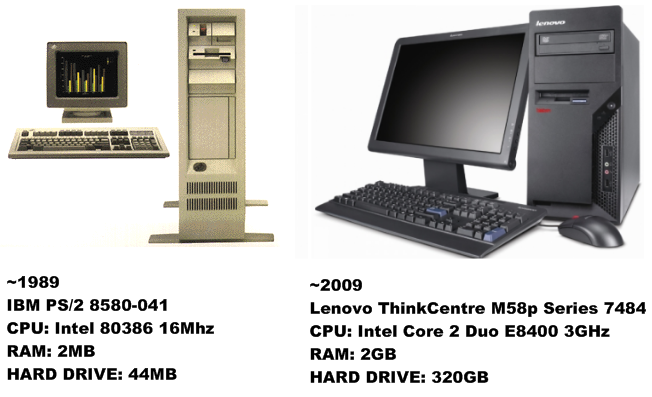
1989

(or, a brief history of unarchivable document formats)

What were you doing 20 years ago? Did you work in an office? Was much of your job centered around creating or editing documents?

Let's assume it was. You may have been using a PC with an Intel 386 CPU:


Tuesday, August 4, 2009

PDF/A: PDF Designed for long-term Archival

Have you ever wondered about how today's documents might look on your computer 20 or 30 years from now? Will they look the same? Will they be viewable at all? While I can't say what might happen with other document formats, I can tell you that today's PDF files will look the same - provided they are saved as PDF/A-1b (ISO 19005-1:2005), a subset of the PDF standard designed for the long-term archival of documents.


Archive Formats

Although there are many formats available for document archival, PDF/A documents are:

Monday, July 27, 2009

Converting PDF Documents into Archivable PDF/A

Convert PDF to PDF/A
Solid PDF Tools allows you to convert your existing PDF documents (normal or scanned) into fully searchable ISO 19005-1 compliant archivable documents. This helps to ensure that you can find the right document when you need it, and that it will appear the same way it did when you archived it.

Many organizations use PDF files to archive important documents. However, just because a document has been stored as a PDF file does not mean that it will be searchable, nor does it mean that it will look the same when viewed years after it was created.