
Since Solid PDF Tools Scan to Word is so much more stable and user friendly than Adobe Acrobat is we figured that expanding our marketing efforts to explain this would be a good idea: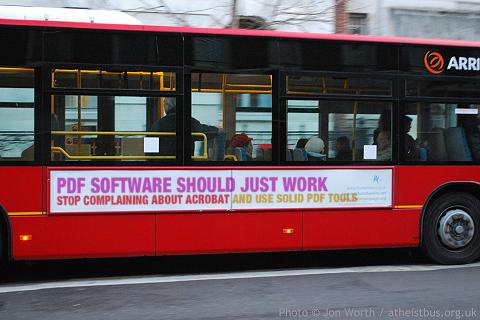
Thanks to ruletheweb.co.uk for making the image generator we used. You can make your own bus slogan at http://ruletheweb.co.uk/b3ta/bus.
Friday, January 30, 2009
Friday Fun - Bus Slogan Generator


Thursday, January 29, 2009
New updates are available...
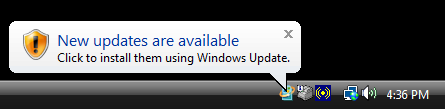
Recently a computer worm, variously known as Downadup, Conficker or Kido, has infected as many as 15 million Windows computers (possibly more at the time of this writing). Although we don't yet know why this worm was written, similar worms in the past have been used for spamming, stealing credit card details and other nefarious things.
Friday, December 5, 2008
Acrobat 9 and Password Encryption in PDF Files (256-bit AES vs. 128-bit AES)
One of the new features in Adobe Acrobat 9 is the ability to use 256-bit AES encryption when password protecting PDF files (instead of the 128-bit AES encryption that Solid PDF Tools Scan to PDF and Adobe Acrobat 7 and later do).
Although this does allow for much longer passwords than before (127 instead of 32), users with passwords less than 32 characters would be much better off using 128-bit AES encryption as the new encryption level makes it much easier than before for hackers to brute force passwords.
Fortunately, users of both Adobe Acrobat 9 and Solid Converter PDF to Word can simply keep using 128-bit AES encryption when password protecting files to retain the level of security they've had in the past.
Care for more technical details? Check out ZDNet and Adobe's blog posts on the subject.
Monday, December 1, 2008
Free Online PDF/A-1b Validation Service
We've launched a free online service for PDF/A-1b validation.
Solid Documents is a member of the PDF/A Competence Center, a cooperation between numerous world-leading companies and experts in PDF technology. PDF/A-1b is an ISO Standard for using the PDF format for the long-term archiving of electronic documents. Not all PDF files meet this ISO 19005-1: PDF/A-1b standard.
To verify that your PDF files are PDF/A-1b compliant, go to www.validatepdfa.com. Use the simple wizard to send us your PDF files via email. Attach the PDF files you want to validate and send. Our validation software will analyze your files and email you the results.
No installation. No hassles. Instant results.
Free PDF Validator uses the industry leading PDF/A validator from Solid PDF Tools. You can find out more about Solid PDF Tools here.
Wednesday, November 26, 2008
Solid Alternative to Adobe® Acrobat® – Solid PDF Tools
Solid PDF Tools does what most users need when creating and working with PDF files, including document security, scan to PDF, OCR for search, and PDF/A creation and validation. In addition, Solid PDF Tools leads the industry in PDF to Word conversion excellence.
Wednesday, November 12, 2008
Free Online PDF to Word Conversion
We've just launched a free service for free PDF to Word conversions.
To use it go to freepdftoword.org, select your conversion options and click a button to make an e-mail message appear with the settings you've chosen. Attach your PDF file and click send. Our servers will convert the file and e-mail your converted Word Document back to you.
Wednesday, November 5, 2008
Change the Default File Format in Word 2007 from .docx to .doc
One thing that many users notice after upgrading to Microsoft® Office 2007 is that by default new Word documents now end in .docx instead of .doc.
Although the new file type offers many improvements over the old one, it can be troublesome to use if you work with many people that have older versions of Office. There are workarounds available from Microsoft, but it's usually easier just to send them something you know they can open.
One way to solve the problem is to simply change the default file format in Word 2007 to DOC.
To do this go into Word 2007 and click the Office Button | Word Options | Save | Save files in this format | Set this to "Word 97-2003 Document (*.doc)" and click OK.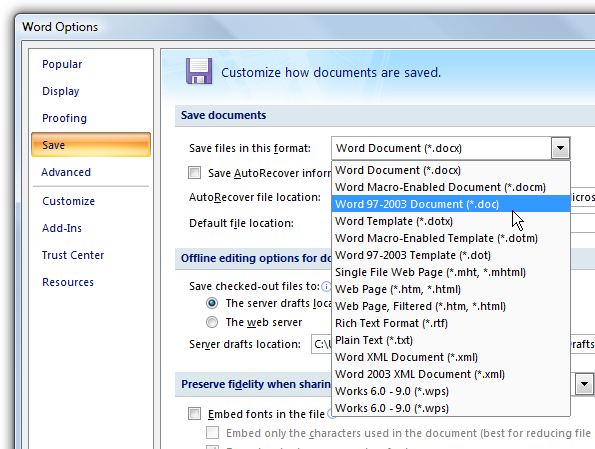
Now you won't have to worry about whether or not your collaborators can read your files.
Subscribe to:
Posts (Atom)

 Follow us on Twitter