
Creating PDF Files
Solid PDF Tools can create PDF documents from most of today's popular file formats...
Simply drag and drop your file from your desktop onto the Solid PDF Tools user interface...
Working With Your New File in Solid PDF Tools
Your new PDF will be displayed in Solid PDF Tools where you can easily rearrange, delete or add pages. Add, or use pre-packaged watermarks and stamps, or optimize your document for it's intended use.
Monday, August 24, 2009
Fast and Easy Drag and Drop PDF Creation


Wednesday, August 5, 2009
1989
(or, a brief history of unarchivable document formats)
What were you doing 20 years ago? Did you work in an office? Was much of your job centered around creating or editing documents?
Let's assume it was. You may have been using a PC with an Intel 386 CPU: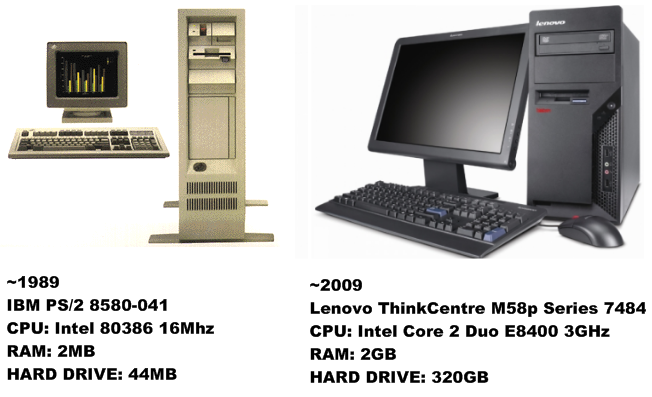
Tuesday, August 4, 2009
PDF/A: PDF Designed for long-term Archival
Have you ever wondered about how today's documents might look on your computer 20 or 30 years from now? Will they look the same? Will they be viewable at all? While I can't say what might happen with other document formats, I can tell you that today's PDF files will look the same - provided they are saved as PDF/A-1b (ISO 19005-1:2005), a subset of the PDF standard designed for the long-term archival of documents.
Archive Formats
Although there are many formats available for document archival, PDF/A documents are:
Monday, July 27, 2009
Converting PDF Documents into Archivable PDF/A
Convert PDF to PDF/A
Solid PDF Tools allows you to convert your existing PDF documents (normal or scanned) into fully searchable ISO 19005-1 compliant archivable documents. This helps to ensure that you can find the right document when you need it, and that it will appear the same way it did when you archived it. Many organizations use PDF files to archive important documents. However, just because a document has been stored as a PDF file does not mean that it will be searchable, nor does it mean that it will look the same when viewed years after it was created.
Monday, July 6, 2009
Extract Tables to Excel

One of the many powerful features of Solid PDF Tools is the ability to extract tables from a PDF file to Excel. The same feature is also available in Solid Converter PDF to Word. You choose whether you want to extract tables from an entire document, from a single page or a range of pages. You can even automate this process with scripts.
Monday, June 29, 2009
Scan to PDF Using Solid PDF Tools

Solid PDF Tools provides a number of powerful scanning features for creating PDF documents, including:
• Scanning multiple pages into one or more PDF documents
• The use of automatic document feeders to scan multiple pages quickly
• Applying OCR during the scanning process to create a searchable text layer in your scanned PDF documents.
Friday, June 12, 2009
Convert PDF to Word with Solid PDF Tools

Converting a PDF document into a Microsoft® Word document is easy with Solid PDF Tools. On the Solid PDF Tools Start Page, simply click the “Convert PDF to Word” link in the “Getting Started” section. Then on the palette choose a file (or files) using the file dialog screen.
Subscribe to:
Posts (Atom)

 Follow us on Twitter