
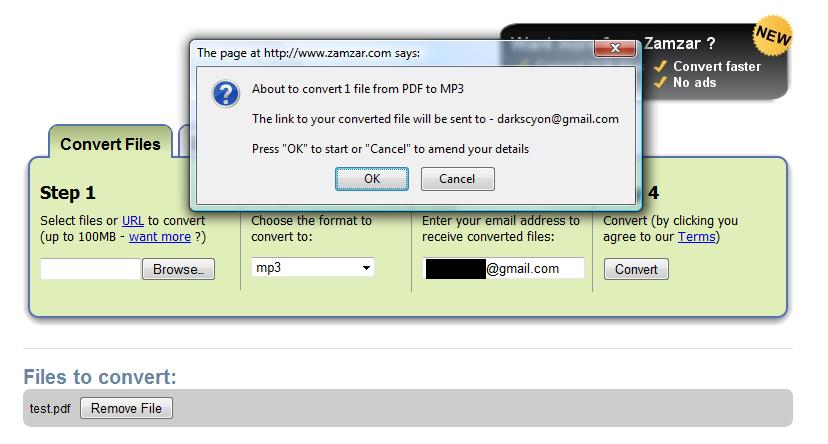
Zamzar has offered various online conversions (including PDF to Word, something our Free PDF to Word service also offers) for some time now.
Recently they added the ability to do text to speech conversions. This new feature is handy for people needing to listen to documents on their personal media players (e.g. iPod, Zune, iRiver) or any other device that can play audio.
We tried doing a free conversion at Zamzar earlier this morning and received a result in a few hours. The audio quality was decent, as it sounds like they're using the free Festival speech synthesizer. As with any free online service, your mileage may vary.
Friday, April 17, 2009
Zamzar Adds Text to Speech Conversions


Thursday, April 9, 2009
Extract Tables from Your PDF Files into Excel
Do you need to get tabular data from a PDF file into Excel? No problem with Solid Converter® PDF to Word or Solid PDF Tools.
Extracting All Tables
Solid Converter PDF and Solid PDF Tools can recognize tables within PDF files even though your PDF doesn’t say “table data” in the file. Bordered and borderless tables are recognized.
Tuesday, March 31, 2009
New Security Concerns Raised For Google Docs
Last week TechCrunch posted an interesting look at some "loopholes" found in Google Docs.
None of them seemed particularly counterintuitive to us, but Google did clarify the issue on the official Google Docs blog.
Monday, March 9, 2009
Choosing the Right Password for your PDF file
Choosing a good password for your PDF file in Solid PDF Tools Scan to PDF can be hard. However, Bruce Schneier reminds us that choosing a bad password has real-world consequences:
February 27, 2009
WIKILEAKS EDITORIAL
Wikileaks has cracked the encryption to a key document relating to the war in Afghanistan. The document, titled "NATO in Afghanistan: Master Narrative", details the "story" NATO representatives are to give to, and to avoid giving to, journalists.
...
Friday, January 30, 2009
Friday Fun - Bus Slogan Generator
Since Solid PDF Tools Scan to Word is so much more stable and user friendly than Adobe Acrobat is we figured that expanding our marketing efforts to explain this would be a good idea: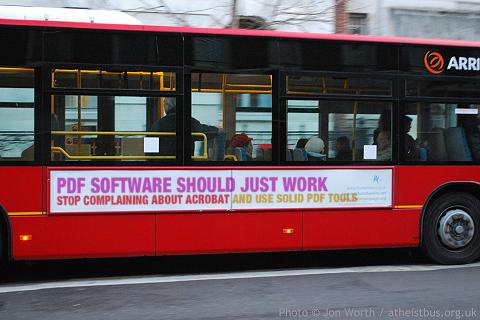
Thanks to ruletheweb.co.uk for making the image generator we used. You can make your own bus slogan at http://ruletheweb.co.uk/b3ta/bus.
Thursday, January 29, 2009
New updates are available...

Recently a computer worm, variously known as Downadup, Conficker or Kido, has infected as many as 15 million Windows computers (possibly more at the time of this writing). Although we don't yet know why this worm was written, similar worms in the past have been used for spamming, stealing credit card details and other nefarious things.
Friday, December 5, 2008
Acrobat 9 and Password Encryption in PDF Files (256-bit AES vs. 128-bit AES)
One of the new features in Adobe Acrobat 9 is the ability to use 256-bit AES encryption when password protecting PDF files (instead of the 128-bit AES encryption that Solid PDF Tools Scan to PDF and Adobe Acrobat 7 and later do).
Although this does allow for much longer passwords than before (127 instead of 32), users with passwords less than 32 characters would be much better off using 128-bit AES encryption as the new encryption level makes it much easier than before for hackers to brute force passwords.
Fortunately, users of both Adobe Acrobat 9 and Solid Converter PDF to Word can simply keep using 128-bit AES encryption when password protecting files to retain the level of security they've had in the past.
Care for more technical details? Check out ZDNet and Adobe's blog posts on the subject.
Subscribe to:
Posts (Atom)

 Follow us on Twitter