
Solid PDF Creator Plus v6 now includes the ability for users to specify options for creating structured PDF files from Microsoft®
Options include:
Hyperlinks - All hyperlinks can be carried over to the new PDF file, or they can be omitted.
Bookmarks - PDF Outline bookmarks can be created according to the logical structure of the original document.
Document Information - Document Summary details in the original document can be used for the Document Information in the new PDF file.
PDF Creation From Word dialog screen. Click to view full size image.
Solid Converter PDF v6 and Solid PDF Tools v6 also include these same options for creating structured PDF documents.
Wednesday, September 30, 2009
Solid PDF Creator Plus v6 Available


Monday, September 21, 2009
Solid PDF Tools v6 Now Available
 Solid Documents has released version 6 of Solid PDF Tools, our popular PDF creation, conversion and archiving software. With Solid PDF Tools you can:
• Convert PDFs to PDF/A
• Validate PDF/A
• Convert PDF to MS Word
• Convert PDFs to HTML
• Convert PDFs to Text
• Convert PDF Tables to Excel
• Scan directly to MS Word
• Create PDF Bookmarks from Office
• And much more!
Per specifications from the PDF/D Consortium, version 6 now exports PDF/A validation and conversion reports. The validator and converter have also been improved to:
• provide support for XMP validation
• pass 100% of the Bavaria Test Suite cases (v5 already passed the Isartor cases)
With the improvements to our PDF/A technology, we believe version 6 is now one of the best PDF/A tools availabe on the market today. This PDF/A functionality is also available to both .NET and C++ developers through our Solid Framework SDK product.
Thursday, September 17, 2009
Solid Converter PDF to Word v6 Now Available

The release of Solid Converter® PDF to Word v6 represents yet another milestone in the development of our popular PDF to Word conversion software. Solid Converter PDF not only gives you the power and flexibility to get the job done, it does so at a fraction of the cost of other PDF to Word conversion products.
What’s new in Version 6? Great new features that will save you time and money.
Convert PDF to HTML. Use advanced document reconstruction to convert PDF to formatted W3C compliant XHTML. Figures out columns. Removes headers and footers and images. PDF to HTML...
Convert PDF to Text. Use advanced document reconstruction to extract flowing text content from your PDFs. Figures out columns. Removes headers and footers and images. PDF to Text...
PDF Bookmarks from Office. Automatically create PDF bookmark outlines from Word, PowerPoint, Excel or Publisher documents.
64 bit Platform Support. Solid Documents products now run seamlessly on Windows XP 64 and Windows Vista 64.
Visit our web site for a complete feature list for Version 6 or to download our FREE 2 week trial version.
Compared to other PDF conversion tools costing hundreds of dollars, Solid Converter PDF to Word v6 is only $79.95 - Buy Now and see how much time you'll save!
Tuesday, September 8, 2009
WYSIWYG Content Extraction
With the Solid PDF Tools WYSIWYG (What You See Is What You Get) user interface you can:
• Extract tables from PDFs directly into an Excel worksheet with a single click.
• Quickly extract vector and bitmap images from your PDF documents.
Extracting Tables to Excel
Using Shift+Click or Ctrl+Click, select the desired pages in your PDF.
Monday, August 24, 2009
Fast and Easy Drag and Drop PDF Creation
Creating PDF Files
Solid PDF Tools can create PDF documents from most of today's popular file formats...
Simply drag and drop your file from your desktop onto the Solid PDF Tools user interface...
Working With Your New File in Solid PDF Tools
Your new PDF will be displayed in Solid PDF Tools where you can easily rearrange, delete or add pages. Add, or use pre-packaged watermarks and stamps, or optimize your document for it's intended use.
Wednesday, August 5, 2009
1989
(or, a brief history of unarchivable document formats)
What were you doing 20 years ago? Did you work in an office? Was much of your job centered around creating or editing documents?
Let's assume it was. You may have been using a PC with an Intel 386 CPU: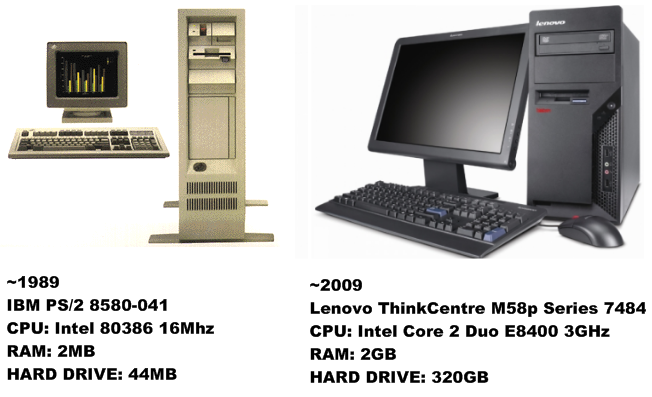
Tuesday, August 4, 2009
PDF/A: PDF Designed for long-term Archival
Have you ever wondered about how today's documents might look on your computer 20 or 30 years from now? Will they look the same? Will they be viewable at all? While I can't say what might happen with other document formats, I can tell you that today's PDF files will look the same - provided they are saved as PDF/A-1b (ISO 19005-1:2005), a subset of the PDF standard designed for the long-term archival of documents.
Archive Formats
Although there are many formats available for document archival, PDF/A documents are:
Subscribe to:
Posts (Atom)

 Follow us on Twitter